Descriere
What Do You Get?
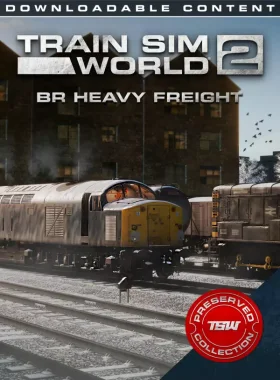
The BR Heavy Freight Pack for Train Sim World® 2 brings iconic British motive power to life with the Class 40 ‘Whistler’ and Class 08 ‘Gronk’ locomotives. Haul heavy freight over the challenging Northern Trans-Pennine route, moving tons of fuel and goods in a bygone era of railroading. This double-loco pack includes authentic liveries, detailed wagons, and immersive scenarios.
Key Features
- BR Class 40 ‘Whistler’ in BR Corporate Blue Livery
- BR Class 08 ‘Gronk’ in BR Corporate Blue Livery
- BR 12T Van Wagon
- BR 100T TEA Bogie Tank Wagon
- Accurate performance and handling
- Highly detailed driving cabs
- Authentic sound recordings
- Three engaging scenarios and tutorial for Northern Trans-Pennine
- Operable in Service Mode with over 10 services
- Powered by SimuGraph® and Unreal Engine 4®
- Download size: 170.8MB
Note: Requires Train Sim World® 2: Northern Trans-Pennine: Manchester – Leeds Route Add-On (sold separately). Part of the Preserved Collection with original release features.
How to Activate
- Create a Steam account if you don’t have one.
- Launch Steam and log in.
- Click on the „Games” tab and select „Activate a Product on Steam”.
- Enter your product key and follow the instructions.
- Download and enjoy the add-on in your library.
What’s Train Sim World® 2?
Train Sim World® 2 delivers realistic train simulation with stunning graphics and physics. Experience the thrill of operating historic locomotives on authentic routes, powered by advanced technology for an immersive experience.
![[REDACTED] PC Epic Games Account](https://stampile-online.cloud/wp-content/uploads/2026/09/thumbnail_1740756801_67c1d741d6398-280x360.webp)
![[ECHOSTASIS] PC Steam CD Key](https://stampile-online.cloud/wp-content/uploads/2026/09/thumbnail_1786216552_6a77806891c3a-280x360.webp)
Recenzii
Nu există recenzii până acum.