Descriere
What Do You Get?
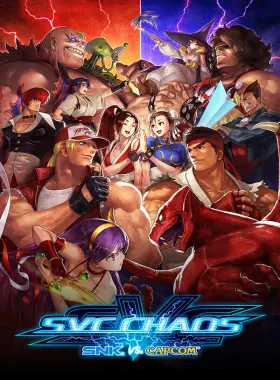
SNK and CAPCOM legends clash in this star-studded crossover fighting game! The 2003 arcade hit SVC CHAOS is back and better than ever with brand-new rollback netcode and tournament modes for fun, fast-paced online matches. Retain the classic visuals and controls while enjoying 36 iconic characters from series like THE KING OF FIGHTERS and STREET FIGHTER. Includes a hitbox viewer and gallery mode with 89 artworks.
How to Redeem
- Create a Steam account if you don’t have one.
- Launch the Steam client and log in.
- Click on the „Games” tab and select „Activate a Product on Steam”.
- Enter the product key and follow the on-screen instructions.
- Once activated, download and play the game from your Library.
What’s Steam?
Steam is the ultimate digital distribution platform for PC gaming, offering a vast library of games, community features, and seamless updates. Access your games anytime, play online with friends, and discover new titles through sales and recommendations.
What’s the Game About?
Dive into SVC CHAOS, where worlds collide in a frantic fight featuring characters like Kyo Kusanagi, Ryu, Terry Bogard, and Chun-Li. Battle in single-player or online modes with rollback netcode for smooth play. Perfect for fighting game fans!
Redemption Instructions
- Download and install the Steam client from store.steampowered.com.
- Create or log into your Steam account.
- Select „Activate a Product on Steam” from the Games menu.
- Enter your product key exactly as provided.
- Confirm activation and download the game.
This key is for worldwide use on Steam.
Requires a stable internet connection.
Recenzii
Nu există recenzii până acum.